
Depth in a mix is often about how close or far a sound feels. I picked up a small trick from Jaycen Joshua about using Waves TrueVerb early reflections to set that distance between the sound and the listener. The focus is distance, not the size of the room.
Why TrueVerb works for distance
TrueVerb is built around early reflections and reverb, and it includes a distance control that simulates how far the source is from the listener. That makes it easy to push a sound back or pull it forward without changing the overall vibe of the mix.
Jaycen’s core idea
In Jaycen’s explanation, early reflections create the perceived distance between the sound and the listener. TrueVerb makes this simple with a visual distance knob so you can slide the sound to the spot you want.
Preset settings from the screenshot
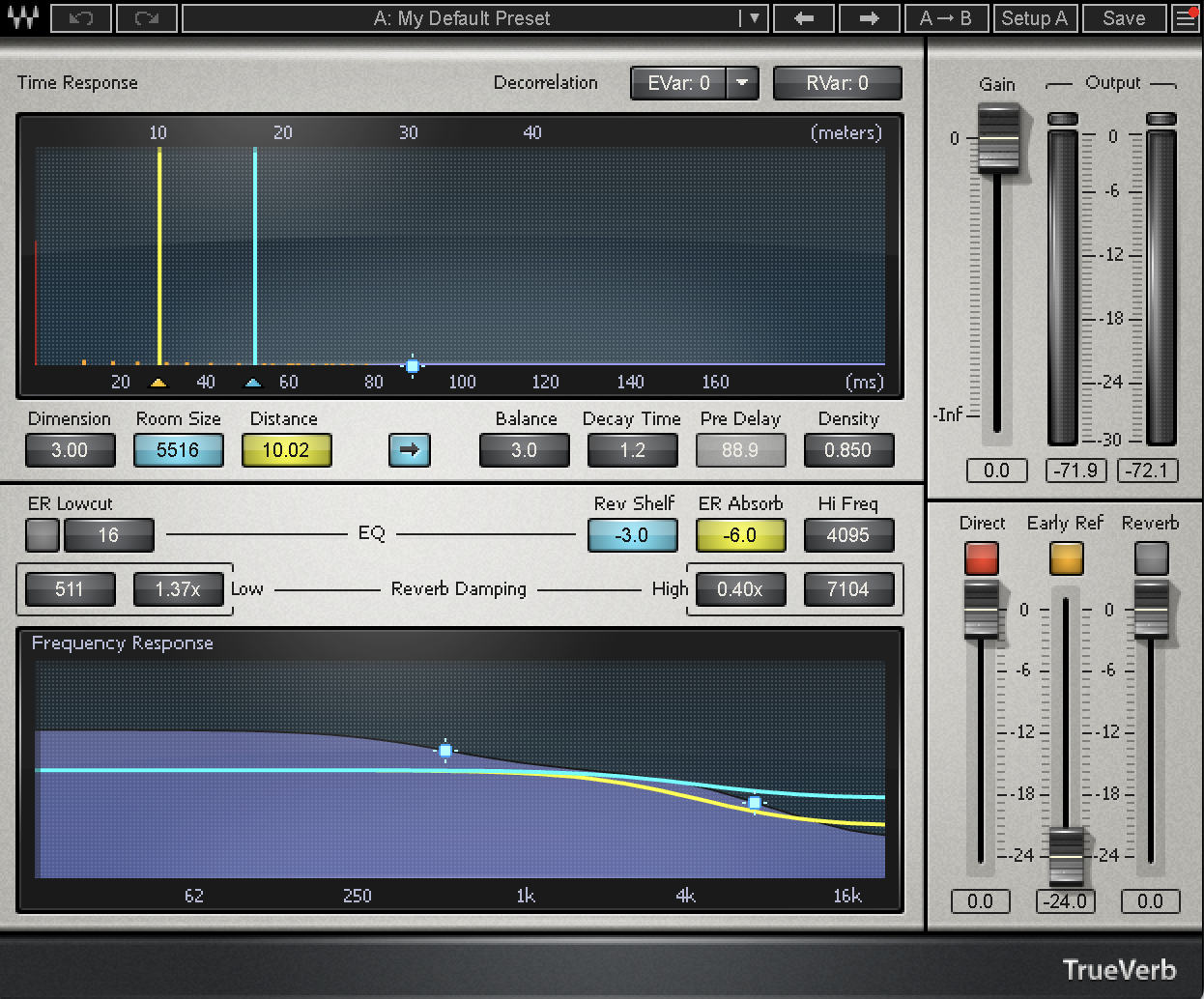
This preset starts from the TrueVerb default. I turn the reverb section off so it is only early reflections, then set the distance to about 10.02 m and adjust to taste. Everything else stays at the default values.
Download the preset
Download the preset: Front to back panner (TrueVerb) preset
Want more mixing notes like this?
If this breakdown helped, join the Kit list for mix notes, presets, and studio updates when I post.
Sources
Sources: Mix with the Masters community thread on early reflections and distance and the Waves TrueVerb product page.